
easyclimate_map.core
Submodules
Classes
A hierarchical data structure that dynamically manages attributes and nested nodes. |
Functions
|
Convert geometries from a GeoDataFrame into matplotlib clipping paths. |
Clip a GeoDataFrame using a rectangular bounding box. |
|
|
Load a DataNode object from native location. |
|
Read a shapefile directly from a 7z archive without extracting to disk. |
|
Extract the outer boundary (exterior ring only) from a GeoDataFrame. |
|
Convert boundary lines (LineString or MultiLineString) to polygon geometries. |
Package Contents
- easyclimate_map.core.get_geometry_path(gdf: geopandas.geodataframe.GeoDataFrame, ax: matplotlib.axes.Axes) easyclimate_map.core.datanode.DataNode
Convert geometries from a GeoDataFrame into matplotlib clipping paths.
This function extracts geometries from a GeoDataFrame, projects them to the coordinate system of the given matplotlib axis, and converts them into matplotlib Path objects suitable for clipping or other operations.
Parameters
- gdf
geopandas.GeoDataFrame The GeoDataFrame containing geometries to be converted. Geometries should be in geographic coordinates (longitude/latitude in degrees) using the EPSG:4326 (PlateCarree) coordinate reference system.
- ax
matplotlib.axes.Axes The matplotlib axis with a cartopy projection. The axis must have a cartopy.crs projection set, which will be used to transform the geometries from geographic coordinates to the map’s coordinate system.
Returns
easyclimate-map.DataNodeA DataNode object containing two items:
- clip_path:
matplotlib.path.Path A compound Path object containing all projected geometries.
- clip_path:
- transform_clip_path:
matplotlib.transforms.TransformedPath The same Path object transformed to data coordinates of the axis.
- transform_clip_path:
Notes
The function assumes input geometries are in geographic coordinates (EPSG:4326 / PlateCarree).
The axis must use a cartopy projection. Standard matplotlib axes without cartopy will not work.
The resulting Path objects can be used for clipping matplotlib plots or other operations that require vector paths.
Examples
>>> import matplotlib.pyplot as plt
>>> import cartopy.crs as ccrs
>>> import geopandas as gpd
>>>
>>> # Create a map with cartopy projection
>>> fig, ax = plt.subplots(subplot_kw={'projection': ccrs.PlateCarree()})
>>> # Load GeoDataFrame (assumed to be in geographic coordinates)
>>> gdf = gpd.read_file('path/to/shapefile.shp')
>>> # Convert geometries to clipping paths
>>> paths = get_geometry_path(gdf, ax)
>>> # Use the paths for clipping
>>> im = ax.imshow(data, transform=ccrs.PlateCarree())
>>> im.set_clip_path(paths['transform_clip_path'])
See Also
cartopy.mpl.path.shapely_to_path: Converts shapely geometries to matplotlib pathsmatplotlib.path.Path.make_compound_path: Combines multiple paths into onematplotlib.transforms.TransformedPath: Applies transformations to paths- gdf
- easyclimate_map.core.clip_rectangle_geometry(gdf: geopandas.geodataframe.GeoDataFrame, *args) geopandas.geodataframe.GeoDataFrame
Clip a GeoDataFrame using a rectangular bounding box.
Supports two parameter styles: 1. Four separate arguments: clip_rectangle_geometry(gdf, lon1, lon2, lat1, lat2) 2. A single list/tuple: clip_rectangle_geometry(gdf, [lon1, lon2, lat1, lat2])
Parameters
- gdf
geopandas.GeoDataFrame The GeoDataFrame to clip
- *argsUnion[float, List[float], Tuple[float]]
Either four separate float arguments (lon1, lon2, lat1, lat2) or a single list/tuple containing four floats
Returns
geopandas.GeoDataFrameThe clipped GeoDataFrame
Examples
>>> # Method 1: Four separate arguments
>>> clipped = clip_rectangle_geometry(gdf, 110, 130, 30, 40)
>>>
>>> # Method 2: Single list argument
>>> clipped = clip_rectangle_geometry(gdf, [110, 130, 30, 40])
- gdf
- class easyclimate_map.core.DataNode(name='root')
A hierarchical data structure that dynamically manages attributes and nested nodes.
The
DataNodeclass provides a flexible way to organize and access data in a tree-like structure. It supports automatic creation of nested nodes, path-style access, and rich HTML representation in Jupyter environments.Parameters
- name
str, optional The name of the root node (default:
"root").
- _attributes
- name = 'root'
- __getattr__(key)
Dynamically access or create node attributes.
Automatically creates nested
DataNodefor non-existent attributes, while filtering out special IPython/Jupyter attribute requests.Parameters
- key
str The attribute name to access.
Returns
- Any
The requested attribute or a new
DataNodeif attribute doesn’t exist.
Raises
- AttributeError
If the attribute is a special IPython/Jupyter attribute.
- key
- __setattr__(key, value)
Set node attributes while protecting internal attributes.
Parameters
- key
str The attribute name to set.
- valueAny
The value to assign to the attribute.
- key
- __getitem__(key)
Access attributes using path-style notation (e.g., “path/to/attribute”).
Parameters
- key
str The attribute path to access, with ‘/’ separators for nested nodes.
Returns
- Any
The value at the specified path.
Raises
- KeyError
If any part of the path doesn’t exist.
- key
- __contains__(key)
- __setitem__(key, value)
Set attributes using path-style notation, creating intermediate nodes as needed.
Parameters
- key
str The attribute path to set, with ‘/’ separators for nested nodes.
- valueAny
The value to assign at the specified path.
- key
- _repr_html_()
Generate HTML representation for Jupyter notebooks.
Returns
strHTML string representing the node and its contents.
- _format_html()
Generate complete HTML representation including styles and scripts.
Returns
strComplete HTML document as a string.
- _format_node_html(node, level=0, parent_id=None)
Recursively generate HTML for a node and its children.
Parameters
- node
DataNode The node to format.
- level
int, optional Current nesting level (default: 0).
- parent_id
str, optional ID of parent node for DOM construction (default: None).
Returns
strHTML string representing the node.
- node
- _format_value(value)
Format values for display, truncating long sequences.
Parameters
- valueAny
The value to format.
Returns
strFormatted string representation of the value.
- format_tree(level=0, html=False, is_last_list=None)
Generate a tree-structured representation of the node.
Parameters
- level
int, optional Current indentation level (default: 0).
- html
bool, optional Whether to generate HTML output (default: False).
- is_last_list
listofbool, optional Track position in hierarchy for proper indentation (default: None).
Returns
strFormatted tree representation.
- level
- __repr__()
- _repr_pretty_(p, cycle)
Support the IPython of pretty printing
- _repr_mimebundle_(include=None, exclude=None)
- __dir__()
- name
- easyclimate_map.core.open_datanode(filepath: str) DataNode
Load a DataNode object from native location.
This function provides a convenient way to load a DataNode that was previously saved using the
DataNode.to_zarr()method.Parameters
- filepath
str The path to the directory containing the saved DataNode data. This should be the same path used with DataNode.to_zarr().
Returns
DataNodeThe loaded DataNode object with all its attributes and nested structure.
Examples
>>> node = open_datanode("path/to/saved_node")
>>> node.some_attribute  # Access attributes as usual
- filepath
- easyclimate_map.core.read_shapefile_from_7z(filepath: str, **kwargs) geopandas.GeoDataFrame
Read a shapefile directly from a 7z archive without extracting to disk.
This function extracts a shapefile from a compressed 7z archive into a temporary directory, loads it as a GeoDataFrame using GeoPandas, and returns the result. All keyword arguments are passed through to gpd.read_file().
Parameters
- filepathstr
Path to the 7z archive containing the shapefile.
- **kwargsdict, optional
Additional keyword arguments to pass to gpd.read_file(). Common arguments include: - bbox : tuple
Filter by bounding box (minx, miny, maxx, maxy)
- maskgeometry
Filter by geometry mask
- rowsint
Number of rows to read
- encodingstr
File encoding (e.g., ‘utf-8’)
- driverstr
GDAL/OGR driver name
Returns
- geopandas.GeoDataFrame
A GeoDataFrame containing the shapefile data.
Raises
- FileNotFoundError
If the 7z file doesn’t exist or doesn’t contain any .shp files.
Notes
The function creates a temporary directory that is automatically cleaned up.
Only the first .shp file found in the archive will be read.
Shapefile companion files (.shx, .dbf, .prj) must also be present in the archive.
Examples
>>> gdf = read_shapefile_from_7z('data.7z')
>>> gdf = read_shapefile_from_7z('data.7z', bbox=(xmin, ymin, xmax, ymax))
>>> gdf = read_shapefile_from_7z('data.7z', encoding='utf-8', rows=1000)
See Also
geopandas.read_file : For available keyword arguments and reading options.
- easyclimate_map.core.extract_outer_boundary(gdf, dissolve_by=None) geopandas.GeoDataFrame
Extract the outer boundary (exterior ring only) from a GeoDataFrame.
This function dissolves all features in a GeoDataFrame and extracts only the outer boundaries, excluding any interior holes or isolated internal lines.
Parameters
- gdfgeopandas.GeoDataFrame
Input GeoDataFrame containing polygon or multipolygon geometries.
- dissolve_bystr or list of str, optional
Column name(s) to dissolve by. If None (default), dissolves all features into a single geometry.
Returns
- geopandas.GeoDataFrame
A GeoDataFrame containing only the outer boundary lines (LineString or MultiLineString geometry).
Examples
>>> import geopandas as gpd
>>> # Load your data
>>> gdf = gpd.read_file('basins.shp')
>>>
>>> # Extract outer boundary of all features
>>> boundary = extract_outer_boundary(gdf)
>>>
>>> # Extract boundary by specific attribute
>>> boundary = extract_outer_boundary(gdf, dissolve_by='BasinName')
>>>
>>> # Save the result
>>> boundary.to_file('boundary.shp')
Notes
For MULTIPOLYGON geometries, extracts the exterior ring of each polygon part
Interior holes (e.g., lakes, enclaves) are excluded
The output CRS is preserved from the input GeoDataFrame
If input contains multiple disconnected regions, output will be MultiLineString
See Also
geopandas.GeoDataFrame.dissolve : Dissolve geometries shapely.geometry.Polygon.exterior : Extract exterior ring
Example(s) related to the function
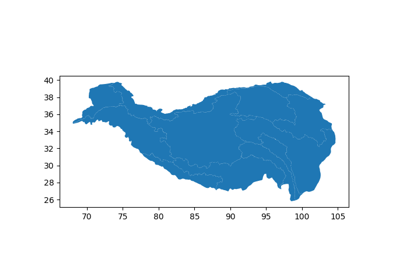
Tibetan Plateau (Qinghai-Xizang Plateau) basins Map
Tibetan Plateau (Qinghai-Xizang Plateau) basins Map
- easyclimate_map.core.transfer_boundary_to_polygon(boundary_gdf) geopandas.GeoDataFrame
Convert boundary lines (LineString or MultiLineString) to polygon geometries.
This function reconstructs polygon geometries from their boundary lines. It assumes the boundary lines form closed rings.
Parameters
- boundary_gdfgeopandas.GeoDataFrame
Input GeoDataFrame containing LineString or MultiLineString geometries representing polygon boundaries.
Returns
- geopandas.GeoDataFrame
A GeoDataFrame containing reconstructed Polygon or MultiPolygon geometries.
Examples
>>> import geopandas as gpd
>>> # Extract boundary first
>>> boundary = extract_outer_boundary(gdf)
>>>
>>> # Convert boundary back to polygon
>>> polygon = boundary_to_polygon(boundary)
>>>
>>> # Save the result
>>> polygon.to_file('reconstructed_polygon.shp')
Notes
Input boundary lines must form closed rings
For MultiLineString input, creates MultiPolygon output
The output CRS is preserved from the input GeoDataFrame
This creates simple polygons without interior holes
See Also
extract_outer_boundary(): Extract outer boundary from polygons shapely.geometry.Polygon : Polygon constructorExample(s) related to the function
Tibetan Plateau (Qinghai-Xizang Plateau) basins Map
Tibetan Plateau (Qinghai-Xizang Plateau) basins Map