
easyclimate_map.core.tool
Utility
Functions
|
Read a shapefile directly from a 7z archive without extracting to disk. |
|
Extract the outer boundary (exterior ring only) from a GeoDataFrame. |
|
Convert boundary lines (LineString or MultiLineString) to polygon geometries. |
Module Contents
- easyclimate_map.core.tool.read_shapefile_from_7z(filepath: str, **kwargs) geopandas.GeoDataFrame
Read a shapefile directly from a 7z archive without extracting to disk.
This function extracts a shapefile from a compressed 7z archive into a temporary directory, loads it as a GeoDataFrame using GeoPandas, and returns the result. All keyword arguments are passed through to gpd.read_file().
Parameters
- filepathstr
Path to the 7z archive containing the shapefile.
- **kwargsdict, optional
Additional keyword arguments to pass to gpd.read_file(). Common arguments include: - bbox : tuple
Filter by bounding box (minx, miny, maxx, maxy)
- maskgeometry
Filter by geometry mask
- rowsint
Number of rows to read
- encodingstr
File encoding (e.g., ‘utf-8’)
- driverstr
GDAL/OGR driver name
Returns
- geopandas.GeoDataFrame
A GeoDataFrame containing the shapefile data.
Raises
- FileNotFoundError
If the 7z file doesn’t exist or doesn’t contain any .shp files.
Notes
The function creates a temporary directory that is automatically cleaned up.
Only the first .shp file found in the archive will be read.
Shapefile companion files (.shx, .dbf, .prj) must also be present in the archive.
Examples
>>> gdf = read_shapefile_from_7z('data.7z')
>>> gdf = read_shapefile_from_7z('data.7z', bbox=(xmin, ymin, xmax, ymax))
>>> gdf = read_shapefile_from_7z('data.7z', encoding='utf-8', rows=1000)
See Also
geopandas.read_file : For available keyword arguments and reading options.
- easyclimate_map.core.tool.extract_outer_boundary(gdf, dissolve_by=None) geopandas.GeoDataFrame
Extract the outer boundary (exterior ring only) from a GeoDataFrame.
This function dissolves all features in a GeoDataFrame and extracts only the outer boundaries, excluding any interior holes or isolated internal lines.
Parameters
- gdfgeopandas.GeoDataFrame
Input GeoDataFrame containing polygon or multipolygon geometries.
- dissolve_bystr or list of str, optional
Column name(s) to dissolve by. If None (default), dissolves all features into a single geometry.
Returns
- geopandas.GeoDataFrame
A GeoDataFrame containing only the outer boundary lines (LineString or MultiLineString geometry).
Examples
>>> import geopandas as gpd
>>> # Load your data
>>> gdf = gpd.read_file('basins.shp')
>>>
>>> # Extract outer boundary of all features
>>> boundary = extract_outer_boundary(gdf)
>>>
>>> # Extract boundary by specific attribute
>>> boundary = extract_outer_boundary(gdf, dissolve_by='BasinName')
>>>
>>> # Save the result
>>> boundary.to_file('boundary.shp')
Notes
For MULTIPOLYGON geometries, extracts the exterior ring of each polygon part
Interior holes (e.g., lakes, enclaves) are excluded
The output CRS is preserved from the input GeoDataFrame
If input contains multiple disconnected regions, output will be MultiLineString
See Also
geopandas.GeoDataFrame.dissolve : Dissolve geometries shapely.geometry.Polygon.exterior : Extract exterior ring
Example(s) related to the function
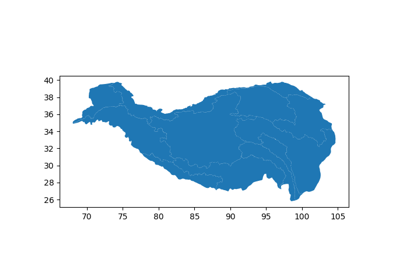
Tibetan Plateau (Qinghai-Xizang Plateau) basins Map
Tibetan Plateau (Qinghai-Xizang Plateau) basins Map
- easyclimate_map.core.tool.transfer_boundary_to_polygon(boundary_gdf) geopandas.GeoDataFrame
Convert boundary lines (LineString or MultiLineString) to polygon geometries.
This function reconstructs polygon geometries from their boundary lines. It assumes the boundary lines form closed rings.
Parameters
- boundary_gdfgeopandas.GeoDataFrame
Input GeoDataFrame containing LineString or MultiLineString geometries representing polygon boundaries.
Returns
- geopandas.GeoDataFrame
A GeoDataFrame containing reconstructed Polygon or MultiPolygon geometries.
Examples
>>> import geopandas as gpd
>>> # Extract boundary first
>>> boundary = extract_outer_boundary(gdf)
>>>
>>> # Convert boundary back to polygon
>>> polygon = boundary_to_polygon(boundary)
>>>
>>> # Save the result
>>> polygon.to_file('reconstructed_polygon.shp')
Notes
Input boundary lines must form closed rings
For MultiLineString input, creates MultiPolygon output
The output CRS is preserved from the input GeoDataFrame
This creates simple polygons without interior holes
See Also
extract_outer_boundary(): Extract outer boundary from polygons shapely.geometry.Polygon : Polygon constructorExample(s) related to the function
Tibetan Plateau (Qinghai-Xizang Plateau) basins Map
Tibetan Plateau (Qinghai-Xizang Plateau) basins Map